Quick Verdict
TraderSync is the second-best trading journal in 2026, scoring 7.8/10 in our testing across 8 categories. It has the widest broker support of any journal (950+ integrations) and offers interactive AI coaching through Cypher AI, market replay with up to 250-millisecond precision, and native mobile apps for iOS and Android. It's a strong choice for traders who want conversational AI guidance and mobile-first design.
Where TraderSync falls short compared to the best in the space is in strategy management, there are no strategy templates, no integrated education platform, and the backtesting is systematic rather than visual. Platforms like TradeZella offer deeper backtesting (11+ years of historical data with ICT indicators), 25+ strategy templates, and a built-in education hub that TraderSync lacks.
Best for: Mobile-first traders, scalpers who need precision replay, and traders who want interactive AI coaching
Price range: $29.95 to $79.95/month (~$16 to $40/mo billed annually)
Verdict: Excellent for AI coaching and mobile use. Falls short on strategy development tools and education compared to more comprehensive platforms.
| Quick Stats | |
|---|---|
| TJ Score | 7.8/10 |
| Trustpilot Rating | 4.7/5 |
| Starting Price | $29.95/mo (~$16/mo billed annually) |
| Free Trial | 7 days |
| Broker Integrations | 950+ |
| Mobile App | iOS & Android |
| Assets Supported | Stocks, Options, Futures, Forex, Crypto |
TJ Score Breakdown: 7.8/10
TraderSync's TJ Score is the average of 8 independently evaluated categories, each scored 1–10. See our full methodology.
| Category | Score |
|---|---|
| Broker Support | 9.5 |
| Reporting & Analytics | 8.5 |
| Journaling Tools | 7.5 |
| Usability & Design | 8.5 |
| Advanced Features | 7.5 |
| Pricing & Value | 7.0 |
| Community & Trust | 7.5 |
| Support & Documentation | 6.5 |
| Overall TJ Score | 7.8/10 |
See our analysis of 1,201 Trustpilot reviews across 5 trading journals, including complaint categories, praise themes, and company response rates compared.
What Is TraderSync?
TraderSync is a cloud-based trading journal platform that combines automated trade tracking, AI-powered coaching, and precision market replay to help traders improve their performance. Founded with a mobile-first philosophy, TraderSync is one of the few trading journals with polished native iOS and Android apps that offer near-complete parity with the desktop experience.
The platform's standout feature is Cypher AI, an interactive, conversational AI coach that learns your trading patterns over time and provides real-time guidance, strategy suggestions, and behavioral feedback. Unlike passive analytics tools that show you data and let you interpret it, Cypher AI actively coaches you through your trading development.
TraderSync connects to 950+ brokers, the widest integration network in the trading journal space, and supports stocks, options, futures, forex, and crypto.
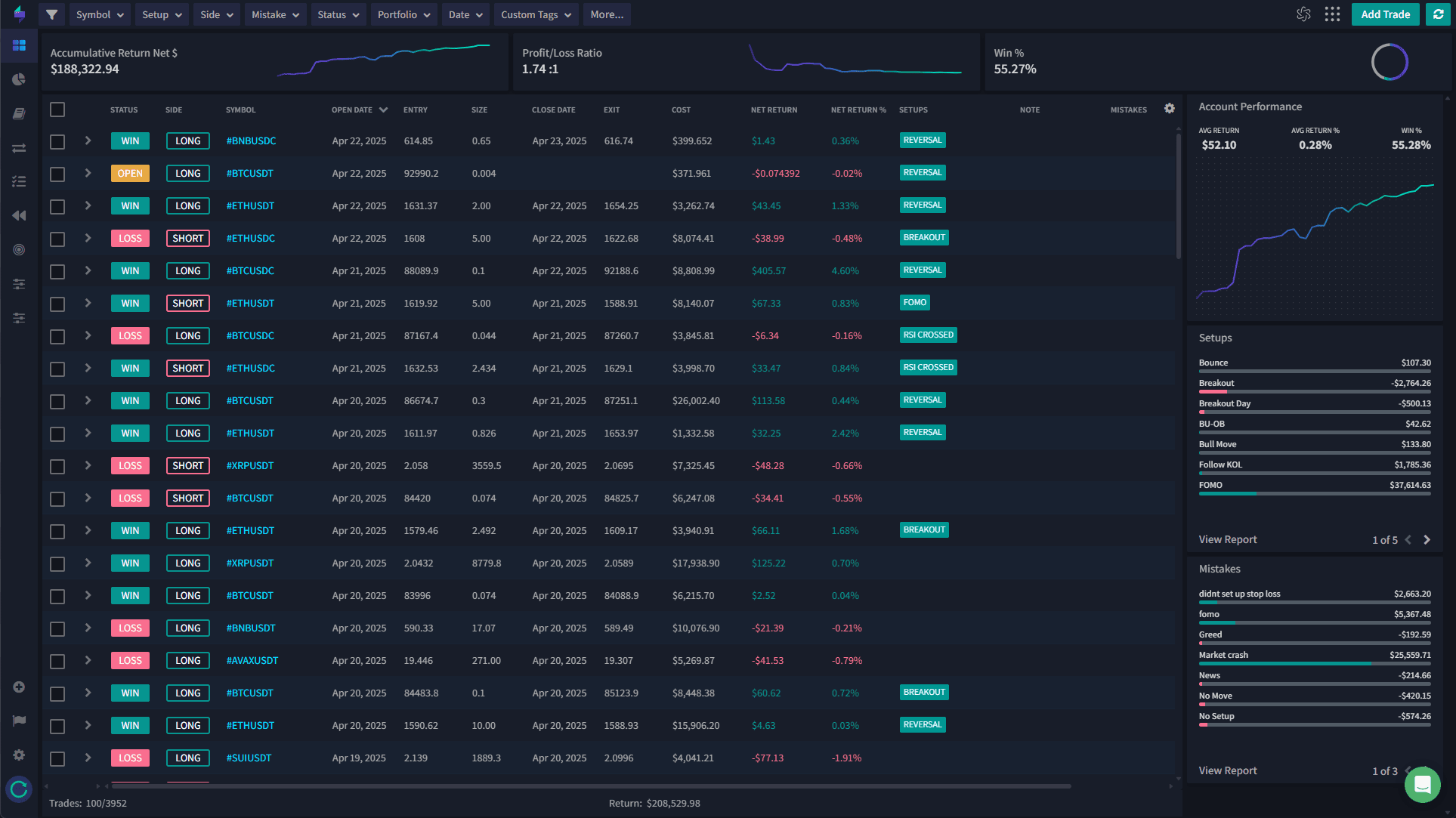
Key Features
Cypher AI: Interactive Trading Coach
TraderSync's headline feature is Cypher AI, a conversational AI coaching system that goes beyond static reports.
Cypher AI learns your trading patterns the more you log. It identifies behavioral blind spots like revenge trading, overconfidence after wins, and position sizing mistakes. It flags setups aligned with your historical edge and suggests strategy adjustments based on your data. The AI becomes more accurate after 50 to 100+ trades, making it increasingly valuable over time.
What makes Cypher AI different from other journal AI features is the interactive, conversational nature. You can ask it questions, get real-time feedback, and receive coaching-style guidance rather than just looking at charts and numbers. For traders who respond well to coaching interaction, this is a meaningful differentiator.
In practice, the Cypher AI interface works like a chat window embedded within your dashboard. You might ask "What time of day am I most profitable?" or "Which setups should I avoid on Mondays?" and Cypher responds with data-backed answers drawn from your personal trade log. The experience feels closer to messaging a human mentor than running a report. It can surface insights you would not think to look for on your own, correlations between hold time and win rate, the impact of position sizing on drawdowns, or patterns around how your emotional state (logged through tags and notes) correlates with performance.
One important caveat: Cypher AI needs a meaningful sample size before its insights are genuinely useful. With fewer than 30 trades logged, the suggestions tend to be generic. The system hits its stride somewhere around 50 to 100 trades, at which point it has enough data to recognize your specific tendencies and edge. Traders who log notes, tag their emotional state, and categorize setups consistently will get significantly more out of Cypher than those who just import raw trade data and leave everything else blank.
Compared to AI features in other journals, Cypher is genuinely a generation ahead in interactivity. Most competing platforms offer AI-generated summaries or static pattern recognition, useful, but passive. TradeZella's AI recap feature, for instance, generates daily and weekly summaries of your performance and flags areas for improvement, but it is not conversational. You read the output; you do not have a dialogue with it. Cypher's chat-based format lets you drill down, ask follow-ups, and direct the analysis toward whatever you are currently trying to improve. For self-directed traders who know what questions to ask, this is a powerful tool.
Market Replay: Three Precision Levels
TraderSync offers Market Replay across three precision tiers based on your subscription:
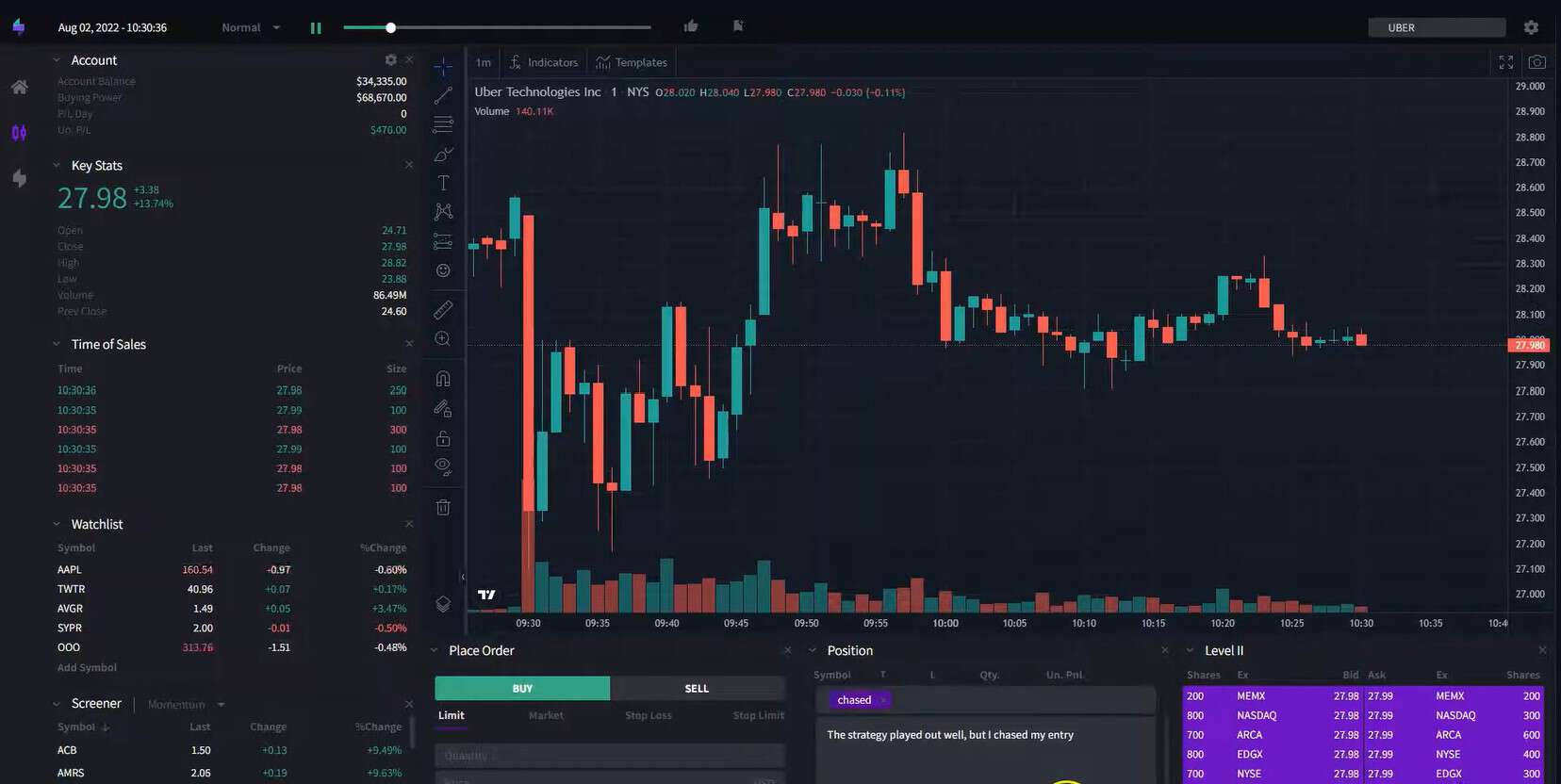
Pro tier: 1-minute bar replay, good for reviewing general trade context and decision flow.
Premium tier: 1-second bar replay, detailed enough for most day traders to review entries and exits with precision.
Elite tier: 250-millisecond bars with Level II order book data, the most precise replay available in any trading journal. Designed for scalpers, execution-focused traders, and anyone who needs to see exactly how the order book looked at the moment of their entry.
The 250ms Elite replay is genuinely unique in the trading journal space. No other platform offers this level of execution-review granularity.
How the replay experience actually works: you select a completed trade from your journal, and TraderSync reconstructs the chart at the moment of your entry. You can then step forward bar-by-bar or let it play at variable speeds. On the Pro tier, each bar represents one minute of price action, which is enough to review the general setup, trend direction, and whether your thesis played out. The Premium tier's 1-second bars let you see the actual price movement within each candle, useful for reviewing entries and exits where a few seconds made the difference between a good fill and a bad one.
The Elite tier is where things get genuinely specialized. The 250ms bars combined with Level II order book data reconstruct the bid/ask spread, order flow, and liquidity at the exact moment you entered or exited a position. For scalpers trading off level II, this is invaluable for reviewing whether you were reading the tape correctly, whether your limit order placement was optimal, or whether you were consistently getting filled at worse prices than expected. No other trading journal offers this depth of execution analysis.
For comparison, TradeZella's replay feature focuses on chart-based visual backtesting with historical data going back 11+ years and support for multi-chart layouts and ICT indicators. The use cases are different: TradeZella's replay is oriented toward strategy development and pattern recognition, while TraderSync's is built for execution review and post-trade analysis. Which matters more depends entirely on whether you are trying to refine your setups or refine your execution.
950+ Broker Integrations
TraderSync's broker network is the largest in the industry. At 950+ integrations, it covers virtually every retail broker globally, including niche regional platforms, prop firms, and specialized futures/forex brokers that smaller networks might miss.
For most US and European traders, any journal with 200+ integrations covers the major platforms. But for traders using less common brokers or trading across multiple regions, TraderSync's breadth is a genuine advantage.
Broker Integration: How It Works
TraderSync offers three methods for getting your trade data into the platform: automatic sync, file upload, and manual entry. The method available to you depends on your broker.
For supported brokers with direct API connections, including major platforms like TD Ameritrade, Interactive Brokers, Webull, Tastytrade, and TradeStation, trades sync automatically. You connect your brokerage account once, and new trades appear in your journal without any manual effort. The sync interval varies by broker, but most update within minutes of trade execution. This is the ideal workflow and works seamlessly for the most popular US brokers.
For brokers without direct API connections, TraderSync accepts CSV and other file exports. You download your trade history from your broker's platform and upload it to TraderSync, which parses the data and maps it to the correct fields. The platform supports file formats from hundreds of brokers, including many prop firms (FTMO, MyForexFunds, The5ers, and others) and international brokers that are not commonly supported elsewhere. If your broker has any kind of trade export functionality, there is a good chance TraderSync can ingest it.
Manual trade entry is also available, which works for traders using platforms with no export capability or for those who want to log paper trades, simulated trades, or trades from platforms TraderSync does not yet support. The manual entry form captures all essential fields, ticker, direction, entry/exit price, quantity, date/time, and fees, plus optional fields for notes, tags, and setup categorization.
For traders who work with multiple brokers or trade across different asset classes with different platforms, TraderSync's integration breadth is a practical advantage. Your stocks from Webull, futures from NinjaTrader, and forex from OANDA can all live in a single journal with unified analytics. Competing platforms like TradeZella and Edgewonk support fewer integrations (though they cover the most popular brokers), so this only becomes a meaningful differentiator if you use a less common platform.
Strategy Checker
The Strategy Checker is a rule compliance tool that tracks whether you follow your own trading rules. Define your rules, position size limits, maximum daily loss, profit targets, trade timing windows, and TraderSync monitors your compliance across every trade.
Over time, you can see your compliance percentage, identify which rules you break most often, and understand how rule-following correlates with profitability. It's a discipline tool rather than a strategy development tool, it helps you stick to your plan, not build one.
It's worth noting that this is different from strategy templates offered by platforms like TradeZella, which include 25+ ready-made strategy templates and full strategy management with performance tracking. TraderSync's Strategy Checker complements an existing strategy rather than helping you develop one from scratch.
Systematic Backtesting
TraderSync offers systematic, rule-based backtesting with 70+ technical indicators, 100+ candlestick patterns, and 30,000+ assets. You define entry/exit conditions using price-based rules and the system tests your criteria against historical data.
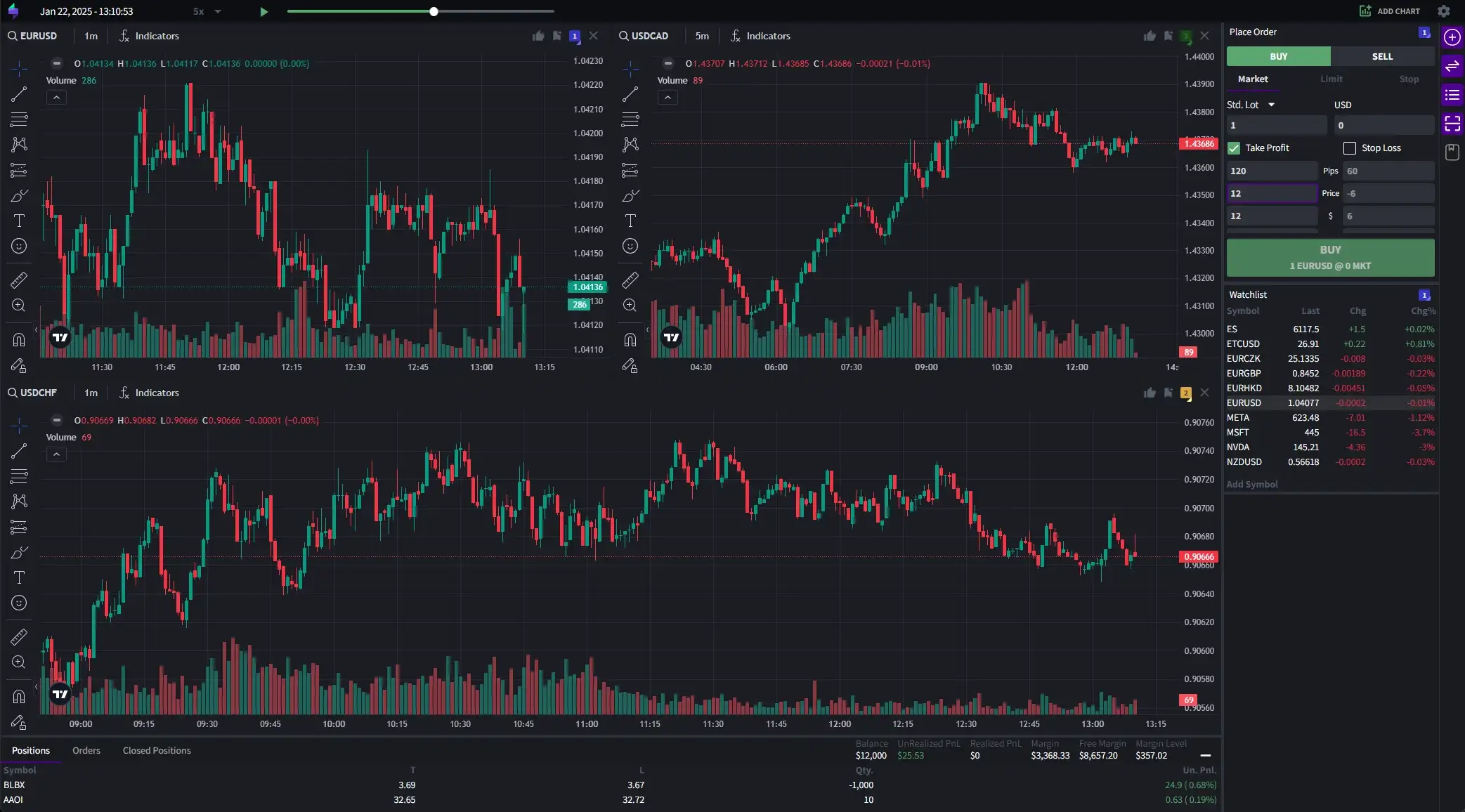
This approach works well for systematic traders building indicator-based strategies. For discretionary traders who prefer visual chart-based backtesting, placing trades on historical charts as if trading live, other platforms like TradeZella offer a more hands-on backtesting experience with 11+ years of data, multi-chart layouts, and built-in ICT indicators.
Mobile Apps
TraderSync's iOS and Android apps are the best in the trading journal space. They offer near-complete desktop parity, trade logging, AI coaching, analytics, Market Replay, and full dashboard access from your phone.
For traders who review trades on the go, log notes during the trading day, or want coaching feedback without sitting at a desktop, the mobile experience is excellent. This is a significant advantage over most competitors, which either lack mobile apps entirely or offer limited mobile functionality.
The app includes full trade logging with all fields available on desktop, meaning you can categorize setups, add tags, and write notes from your phone immediately after a trade. The analytics section mirrors the desktop dashboard with performance charts, P&L curves, win rate breakdowns, and Cypher AI access. Market Replay is also accessible on mobile, though the smaller screen makes it less practical for detailed 250ms analysis, it works fine for 1-minute and 1-second reviews.
Push notifications are available for Cypher AI insights, daily performance summaries, and rule-compliance alerts from the Strategy Checker. This means the app can proactively notify you about patterns in your trading without you having to open the journal and check manually.
What is missing on mobile compared to desktop: the backtesting module is not available on the mobile apps, and some advanced reporting views are simplified or absent. Multi-monitor chart layouts and detailed Level II replay are better experienced on a desktop screen for obvious reasons. But for the core journal workflow, log, review, get AI feedback, the mobile app is functionally complete.
For context, most competitors either have no mobile app at all (Edgewonk is desktop-only), or offer limited mobile web access that does not match the native app experience TraderSync provides. TradeZella has a responsive web platform accessible on mobile browsers but no native app. TraderSync's dedicated iOS and Android apps provide a significantly better mobile experience.
Pricing
TraderSync has three tiers:
Pro: $29.95/month (~$16/mo annually)
Includes Cypher AI coaching, 1-minute Market Replay, Strategy Checker, basic analytics, and mobile access.
Premium: $49.95/month (~$25/mo annually)
Adds 1-second Market Replay, deeper AI coaching capabilities, and additional analytics.
Elite: $79.95/month (~$40/mo annually)
Adds 250ms Market Replay with Level II data, full API access, and all premium features.
TraderSync offers a 7-day free trial, which is an advantage over platforms that require paid commitments upfront.
Annual billing discounts are significant, up to 50% off monthly pricing. But the Elite tier at $79.95/month (or ~$40/mo annually) makes TraderSync one of the more expensive journals if you want the full feature set.
To break this down more concretely: the Pro tier is the entry point and includes the core journal experience, automated trade imports from 950+ brokers, the full analytics dashboard, Cypher AI in its standard mode, 1-minute Market Replay, the Strategy Checker, and full mobile app access. For most traders who are primarily interested in trade logging, AI coaching, and basic performance analysis, Pro covers the essentials.
The Premium tier upgrades Market Replay from 1-minute to 1-second precision and unlocks deeper Cypher AI coaching capabilities, including more granular pattern analysis and additional behavioral insights. It also adds expanded analytics views and reporting features. The jump from Pro to Premium makes sense for active day traders who review their executions closely and want more detailed AI feedback on their patterns.
The Elite tier is purpose-built for high-frequency and execution-focused traders. The 250ms Market Replay with Level II order book data is the headline addition, along with full API access for custom integrations and data export. At nearly $80/month (or $40/mo on annual billing), it is a significant investment, roughly double the cost of most competing trading journals. The Elite tier is only justified if you specifically need sub-second replay with order book data, or if you require API access for programmatic workflows.
How does TraderSync pricing compare to the field? TradeZella starts at $29/mo (Basic) and $49/mo (Premium), both including backtesting, strategy templates, AI recaps, education, and mentor tools. Edgewonk is $197/year (about $16/mo) for its full feature set. TraderSync's Pro tier is competitively priced, but the total cost to access its most differentiated features (250ms replay, advanced AI) pushes it toward the expensive end of the market.
Pros and Cons
Pros:
- Cypher AI is the most interactive AI coach in the journal space
- 250ms Market Replay with Level II data (Elite) is unmatched
- 950+ broker integrations, widest network available
- Polished iOS and Android apps with desktop parity
- 7-day free trial
- 4.7/5 Trustpilot rating from 312 reviews (91% five-star). Our Trustpilot analysis found 75% of positive reviews praise customer support; top complaint is bugs and data import issues (36% each).
Cons:
- No strategy templates, can't document or share strategies
- No integrated education platform (unlike TradeZella's Zella University)
- No mentor mode for coaches and educators
- Elite tier ($79.95/mo) is expensive for full features
- Systematic backtesting only, no visual chart-based testing
- No built-in ICT indicators
How TraderSync Compares
TraderSync excels in areas where it innovates. Cypher AI, mobile apps, 250ms replay, and broker coverage. But it lacks the strategy development and education tools that define more comprehensive platforms. TradeZella offers 25+ strategy templates, backtesting with 11+ years of data and ICT indicators, Zella University education, and Spaces mentor tools, features TraderSync doesn't have. Edgewonk offers superior psychology tracking through the Tiltmeter at a lower price point.
TraderSync's sweet spot is the trader who values AI coaching and mobile access above all else, or the scalper who needs 250ms replay precision.
| Feature | TraderSync | TradeZella | Edgewonk |
|---|---|---|---|
| AI Features | Cypher AI (conversational coach) | AI Recap (daily/weekly summaries) | None |
| Market Replay | 250ms with Level II (Elite) | Visual backtesting, 11+ yr data | None |
| Broker Integrations | 950+ | 500+ | 170+ |
| Mobile App | iOS & Android (native) | No (web responsive) | Desktop only |
| Strategy Templates | No | 25+ templates | No |
| Psychology Tracking | Tags & notes | Tags & notes | Tiltmeter system |
| Education Platform | No | Zella University | No |
| Mentor Tools | No | Spaces (unlimited students) | No |
| Backtesting | Systematic/rule-based | Visual/chart-based + ICT | No |
| Starting Price | $29.95/mo ($16/mo annual) | $29/mo (Basic) | $197/year |
| Trustpilot Rating | 4.7/5 | 4.8/5 | 4.7/5 |
Against TradeZella specifically, the trade-offs are clear. TraderSync wins on AI interactivity (Cypher is conversational; TradeZella's AI recaps are read-only), mobile experience (native apps vs. mobile web), broker coverage (950+ vs. 500+), and execution replay precision (250ms vs. visual backtesting). TradeZella wins on strategy development (templates, management, sharing), education (Zella University), mentorship (Spaces), visual backtesting (11+ years of data with ICT indicators), and overall feature breadth within a single pricing tier.
Against Edgewonk, TraderSync offers significantly more features: AI coaching, market replay, mobile apps, and deeper broker integration. Edgewonk's advantage is pricing ($197/year is roughly one-third the cost of TraderSync Premium on annual billing) and its Tiltmeter psychology tracking system, which is the most structured emotional analytics tool in the space. Edgewonk is the right choice for budget-conscious traders focused on psychology; TraderSync is the right choice for traders willing to pay more for AI coaching and replay tools.
Who Should Use TraderSync
TraderSync is an excellent fit for several specific trader profiles:
Mobile-first traders who do most of their journaling and review from a phone or tablet. TraderSync's native apps are the best in the category, and no other journal matches the mobile experience.
Scalpers and execution-focused traders who need to review trades at sub-second precision. The 250ms replay with Level II data on the Elite tier is a capability no other trading journal offers.
Self-directed traders who want AI coaching. Cypher AI is the most interactive AI feature available in any trading journal. If you are the type of trader who benefits from external feedback and wants a system that actively coaches you based on your data, TraderSync delivers that better than anyone.
Multi-broker traders who use less common platforms or trade across multiple regions. The 950+ broker integration network means you are unlikely to find a broker that TraderSync cannot import from.
Who Should Look Elsewhere
Beginners who need structure. TraderSync has no education platform, no strategy templates, and no guided learning path. If you are still developing your trading approach, platforms with built-in education (TradeZella's Zella University, for example) will serve you better.
Educators and mentors. TraderSync has no mentor mode, no student management, and no way for coaches to review their students' trade logs. TradeZella's Spaces feature is purpose-built for this use case.
Discretionary traders focused on strategy development. If your primary goal is to build, test, and refine trading strategies using visual backtesting on historical charts, TraderSync's systematic backtesting module is not designed for that workflow. TradeZella's visual backtester with 11+ years of data and ICT indicators is a better fit.
Budget-conscious traders. If you want a capable journal at the lowest possible cost and do not need AI coaching or market replay, Edgewonk at $197/year offers excellent analytics and psychology tracking at a fraction of TraderSync's annual cost.
Frequently Asked Questions
Does TraderSync have backtesting?
Yes, systematic, rule-based backtesting with 70+ indicators and 100+ candlestick patterns across 30,000+ assets. It's more automated/rule-based than visual chart-based backtesting offered by platforms like TradeZella.
How does Cypher AI work?
Cypher AI is an interactive, conversational coaching system that learns your trading patterns over time. It identifies behavioral blind spots, suggests strategy adjustments, and provides real-time guidance. It becomes more accurate after 50 to 100+ logged trades.
Does TraderSync have strategy templates?
No. TraderSync has a Strategy Checker (rule compliance tool) but no strategy templates or strategy management system. For ready-made strategy templates, TradeZella offers 25+ professional strategy templates.
Is there a free trial?
Yes, 7 days. This is an advantage over some competitors that require immediate paid commitments.
Can I share reports or export data from TraderSync?
Yes. TraderSync lets you export your trade data as CSV files, which is useful for custom analysis in spreadsheets or migrating to another platform. The Elite plan also includes full API access for programmatic data retrieval and custom integrations. For sharing, you can generate performance reports within the platform, though there is no dedicated public sharing or community feed like Tradervue offers.
Does TraderSync have backtesting?
Yes. TraderSync offers a systematic backtesting feature that lets you replay and analyze past trades. However, it is more limited than TradeZella's backtesting engine, which provides 11+ years of historical data, multi-chart layouts, and built-in ICT indicators. TraderSync's backtesting focuses on reviewing past executions rather than testing new strategies against historical price data.
How does Cypher AI work in TraderSync?
Cypher AI is TraderSync's conversational AI coach. You can ask questions about your trading data in natural language (e.g., "What is my win rate on breakout trades this month?") and Cypher responds with data-driven answers. It also provides proactive coaching suggestions based on patterns it identifies in your journal. Cypher AI is available on Premium and Elite plans.
Is TraderSync better than TradeZella?
TraderSync has advantages in mobile access (native iOS and Android apps), broker coverage (950+ vs 500+), and the conversational Cypher AI. TradeZella scores higher overall in our testing (TJ Score 9.4 vs 7.8) due to deeper analytics (50+ reports), more comprehensive backtesting, trade replay, built-in education (Zella University), and simpler pricing. The right choice depends on whether mobile access and broader broker coverage (TraderSync) outweigh analytics depth and trader development tools (TradeZella) for your needs.
What is the difference between TraderSync Pro, Premium, and Elite?
Pro ($29.95/mo) includes journaling, basic analytics, and trade replay. Premium ($49.95/mo) adds Cypher AI, advanced analytics, and options replay. Elite ($79.95/mo) adds 250ms replay precision with Level II data and API access. Most traders find Premium sufficient. Elite is designed for professional scalpers who need tick-level replay detail.
Does TraderSync support prop firm trading?
Yes. TraderSync supports most prop firm platforms through its 950+ broker integrations. You can track prop firm accounts alongside personal accounts. However, TraderSync does not have a dedicated prop firm mode like TradeZella's Prop Firm Sync, which is specifically designed for managing multiple evaluations and tracking payouts from a single dashboard.